


Sales Director


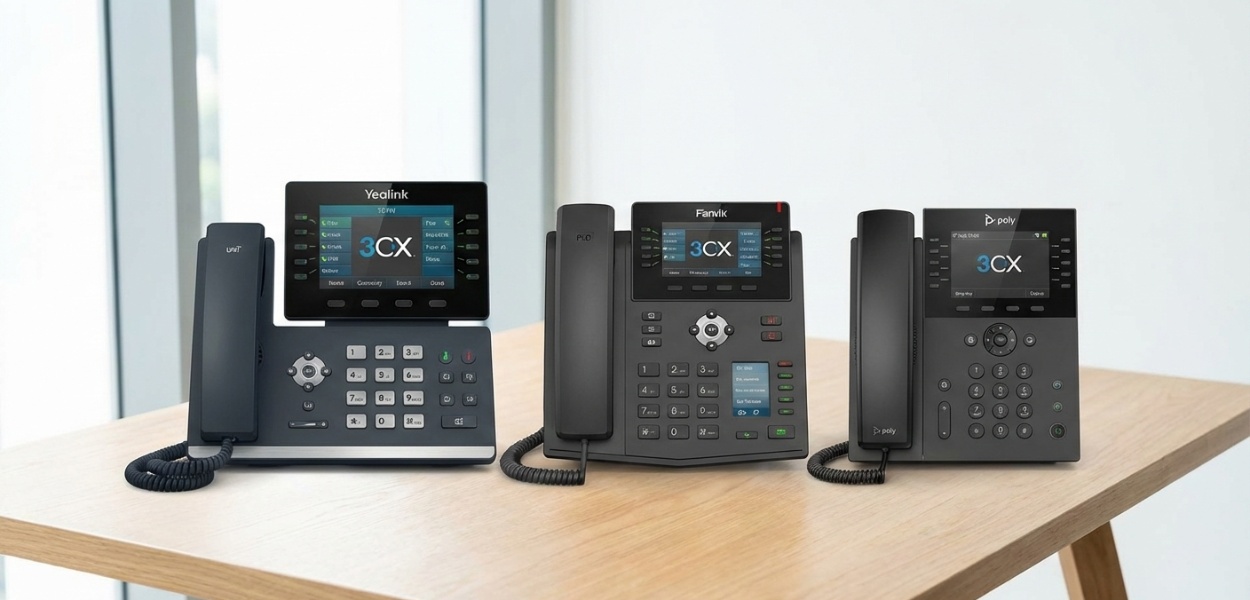


A modern VoIP-based PBX is only as good as its endpoints. For the IT decision-maker, selecting the right hardware is a critical step in any 3CX deployment. While the 3CX softphone and mobile apps are best-in-class, the physical desk phone remains a staple of the business environment, offering reliability, superior audio quality, and a familiar user experience. As The Ultimate 3CX Guide for Business: Setup, Pricing, Features, and Best Practices highlights, choosing a "preferred" or "supported" phone is essential for a smooth deployment.
But which brand do you choose? And more importantly, how do you deploy them, especially for remote users? This guide provides a detailed comparison of the best 3CX compatible phones from the "big three" supported vendors: Yealink, Fanvil, and Poly. We'll break down the top models for different user types, explain the crucial differences in provisioning methods, and provide a clear guide to using a Session Border Controller (SBC)—the only professional way to deploy remote desk phones.
3CX classifies phones as "Supported" or "Legacy". A "Supported" phone means 3CX has tested it, provides a provisioning template for it, and allows it to be provisioned via the "Plug and Play" (PnP) method. Yealink, Fanvil, and Poly (formerly Polycom) are the top-tier supported brands, all readily available in the UK.
Here are our top picks for 2026, broken down by user needs.
These are for common areas, lobbies, break rooms, or users with light call volume. They prioritise reliability and value over advanced features.
Why: The T3 series is the workhorse of 3CX deployments. They are affordable, incredibly reliable, and support all core 3CX features.
T31P: Grayscale screen, 2-line keys, PoE.
T33G: Colour screen, 4-line keys, Gigabit Ethernet.
Verdict: The T33G is often the sweet spot, as the colour screen and gigabit ports are worth the small price bump for a standard office user.
Why: Fanvil has become a major competitor by offering more features for the same price. The X4U is a popular entry-level model.
Features: Two colour screens (one main, one for DSS/BLF keys), 12 line keys, Gigabit, PoE.
Verdict: Fanvil often wins on "features-per-pound." For a user who needs a decent number of Busy Lamp Fields (BLFs), the X4U is an outstanding value.
Why: Whilst Poly is often seen as a premium (and more expensive) brand, the VVX 150 (grayscale) and 250 (colour) are their entry-level contenders.
Features: Exceptional audio quality (Poly's "Acoustic Fence"), solid build.
Verdict: Choose Poly if your organisation is standardising on the brand or if pristine, best-in-class audio quality is the number one priority, even for entry-level users.
These are for managers, executives, and high-volume users (like receptionists or sales) who live on their phone and need advanced features like Wi-Fi, Bluetooth, and many BLF keys.
Why: The T5 series is the "executive" standard. The T54W is arguably the most popular 3CX phone in this class.
Features: Large 4.3" colour screen, built-in Wi-Fi and Bluetooth, 10-line keys, 27 "paperless" DSS keys (BLFs), and a USB port for expansion modules.
Verdict: The built-in Wi-Fi and Bluetooth are game-changers. Bluetooth allows pairing a wireless headset (like a Plantronics or Jabra) directly to the phone, and Wi-Fi eliminates the need for a network drop at an executive's desk.
Why: Fanvil's executive-tier V series.
Features: Built-in Wi-Fi and Bluetooth, large colour screens, and (on the V65) an adjustable screen and antibacterial plastic.
Verdict: Again, Fanvil competes aggressively by matching Yealink's features at a highly competitive price point.
Why: A mid-range powerhouse focused on performance.
Features: 4.3" colour screen, 12-line keys, USB port (for Wi-Fi/Bluetooth adapter, not built-in), and Poly's legendary audio.
Verdict: A solid choice, but the lack of built-in Wi-Fi/Bluetooth on the base model makes the Yealink T54W a more modern and flexible option for many.
These are for users who need to be mobile within the office, such as warehouse managers, retail floor staff, or medical professionals.
Why: This is the go-to DECT solution for 3CX. The W70B base station is a powerful SIP base that can handle up to 10 handsets and 20 simultaneous calls.
Features: Excellent range, great battery life, and seamless call handoff between base stations (with an optional DECT manager).
Verdict: The most robust, scalable, and reliable DECT solution for 3CX.
Fanvil also offers DECT solutions, but Yealink's W-series is widely considered the industry benchmark for 3CX compatibility and performance.
Key Takeaway: When choosing a business phone system, ensuring hardware compatibility from the outset will save significant configuration time and reduce support tickets later.
Getting your new phone to talk to your 3CX server is called "provisioning." 3CX offers several methods, and choosing the right one is critical.
This is the simplest, most "magical" way to set up a phone.
How it works:
Pros: Incredibly simple, no technical knowledge needed, zero-touch for the user.
Cons: Only works on the local LAN. It cannot cross subnets or the internet.
This is the "old" way to provision a remote phone without an SBC.
How it works:
Pros: Allows provisioning a remote phone without extra hardware.
Cons:
Verdict: Do not use this method. It is a troubleshooting nightmare.
This is the modern, secure, and professional method for deploying remote phones. This will be covered in the next section.
If you have a remote office (or even a single remote home user) with desk phones, an SBC is not optional. It is a requirement for a stable, secure setup.
What is an SBC? A Session Border Controller (SBC) is a free, lightweight piece of software from 3CX. Its job is to create a single, secure, encrypted tunnel from the remote network back to your 3CX server (which is in the cloud or at your main office). All the phones at the remote site then talk to the local SBC, which bundles their traffic (both SIP signalling and RTP-audio) and sends it securely down the tunnel.
The SBC software needs to run on an "always-on" device at the remote location.
For Raspberry Pi: Download the 3CXPi ISO. Flash it to an SD card using BalenaEtcher. Boot the Pi. It will auto-install Debian and the SBC.
For Debian/Windows: Follow the 3CX SBC installation guide on their website. It's a simple command-line install on Debian or a .exe installer on Windows.
On the SBC device you just set up (e.g., via the Raspberry Pi's command-line prompt), the installer will ask for your Provisioning URL.
For more information on SIP and VoIP technology, visit our dedicated resource centre.
Even with the best phones, you'll hit snags. Here are the 99% of problems.
The Cause: Firmware. This is the #1 issue. 3CX requires a specific minimum firmware version to provision a phone. A brand new phone, fresh from the box, may have an old, non-compliant firmware.
The Fix:
The Cause (Local): Your network is blocking multicast. This can be a setting on your router or managed switch. "IGMP Snooping" or other multicast-blocking features can prevent PnP.
The Fix (Local): Ensure multicast is allowed on the VLAN/subnet that the phones and 3CX server are on.
The Cause (Remote SBC): The phone is not on the same subnet as the SBC, or the SBC service is not running.
The Fix (Remote SBC):
The Cause: The extension is not correctly configured to "push" its status.
The Fix:
Building a reliable 3CX phone system requires a solid foundation of supported hardware. By standardising on "Big 3" brands like Yealink, Fanvil, and Poly, you ensure 100% compatibility and access to easy provisioning.
For all remote deployments, from a single home user to a 50-person branch office, the Session Border Controller (SBC) is the key. It transforms a complex, insecure, and unreliable STUN setup into a secure, stable, "plug-and-play" experience. Investing in a £50 Raspberry Pi for an SBC will save you dozens of hours in troubleshooting and guarantee a crystal-clear, professional-grade phone system for your remote users.
Building a reliable 3CX system requires a solid foundation of supported hardware. By standardising on "Big 3" brands like Yealink, Fanvil, and Poly, you ensure 100% compatibility and access to easy provisioning.
Get Expert Advice TodayComplete guide to 3CX capabilities and licensing options.
Understanding Voice over Internet Protocol technology fundamentals.
Essential guide to SIP trunking for modern business telephony.
Review of the best business phone handsets including Yealink and Fanvil models.

With over 25 years’ experience at T2k, Lee began his career as a telecoms engineer before progressing to Sales Director. He leverages his foundational technical knowledge to provide businesses with impartial, expert advice on modern communications, specialising in VoIP and cloud telephony. As a primary author for T2k, Lee is dedicated to demystifying complex technology for businesses of all sizes.
Tell us your needs — we'll match you with the best system and price.
🔒 No spam. Your details are secure. We'll contact you within 24 hours.
Need help? Give us a call on 0808 202 3200
Rated 4.9


