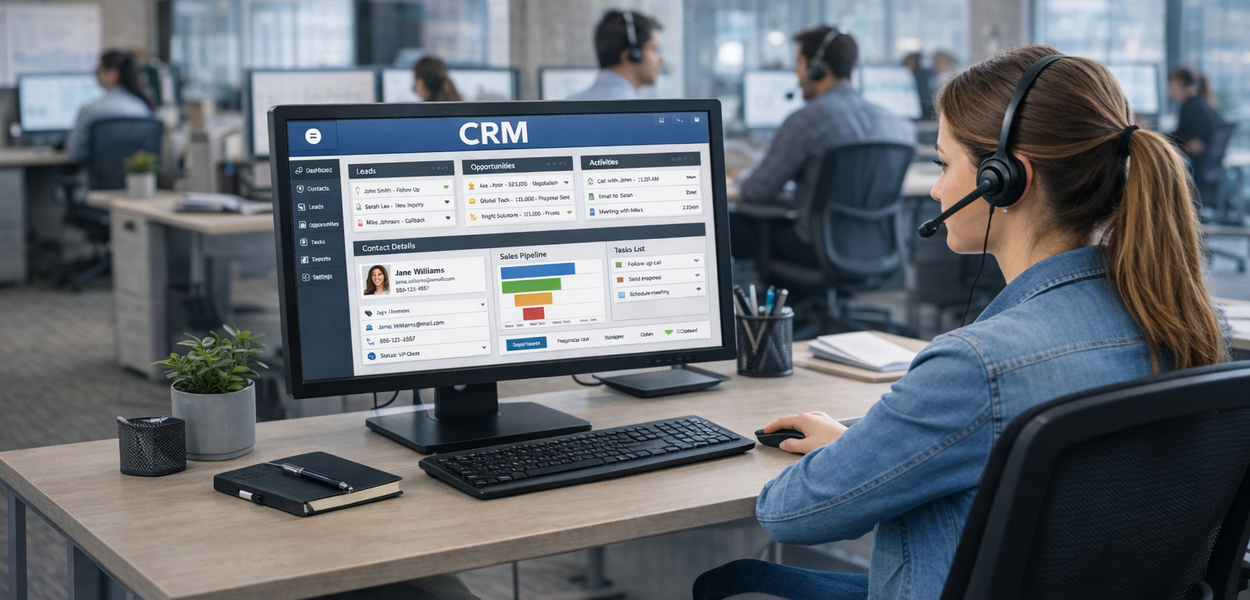
The true power of modern phone systems emerges when they integrate deeply with the Customer Relationship Management (CRM) systems your teams use daily. Rather than the phone being a separate tool, it becomes part of your unified customer interaction platform. For comprehensive context on phone system capabilities, review The Complete Guide to Modern Office Phone System Features: Everything You Need to Know in 2025.
CRM phone system integration benefits are transformative for sales and support teams. When integration is done well, teams spend less time searching for information and more time solving problems or closing sales. Efficiency improvements often exceed 20-30%, and customer satisfaction typically increases measurably. This article explores what integration means, how to select compatible systems, and how to maximise the value.
What is CRM-Phone System Integration and Why It Matters for Sales and Support Teams
Defining Integration
CRM-phone system integration is the process of connecting your phone system and CRM so they share information and functionality seamlessly. Rather than being separate applications, they work together as a unified platform.
At the most basic level, integration means:
- Calls are automatically logged in CRM: When a call happens, the system records that a call occurred (including time, duration, participants) in the CRM without anyone manually creating a record.
- Customer information displays during calls: When a customer calls, the system looks them up in CRM and displays their account information on the agent's screen automatically.
- Phone system features are accessible from CRM: Agents can initiate calls directly from CRM records without manually dialling.
More sophisticated integration means:
- Two-way data flow: Information flows bidirectionally. When information changes in one system, it updates in the other.
- Unified reporting: Reports can combine data from both systems, showing customer journey across communications and business activities.
- Workflow automation: Business processes trigger phone system actions. When a customer is categorised as "VIP," routing might automatically change.
Why This Matters
The impact of integration is straightforward: information accessibility drives efficiency and quality.
Before Integration:
A customer calls. The agent answers. The agent asks "What's your account number?" Customer provides it. Agent manually searches CRM. Agent finally finds the customer record. Then the agent can address the customer's issue. Total time before productive conversation: 2-3 minutes.
After Integration: Customer calls. The phone system identifies them via Caller ID. CRM record appears automatically on agent's screen before the agent even answers. Agent answers with full context: "Hi Ms. Smith, I see you're calling about the order placed last week. Let me look into that for you." Total time before productive conversation: 5 seconds.
This difference compounds throughout hundreds of calls monthly. A support centre with 1,000 calls monthly gains 40-50 hours monthly just from eliminated information lookup time.
Benefits: Automatic Call Logging, Customer History Access, Personalisation, and Resolution Speed
Automatic Call Logging
Automatic call logging means that every call is recorded in CRM without manual data entry.
What's Logged:
- Date and time of call
- Duration of call
- Participants (employee and customer)
- Call outcome (connected, voicemail, transferred, missed)
- Call recording link (if calls are recorded)
Without Logging: Agents must remember to create a record after each call—"I called Ms. Smith about her renewal." This is time-consuming and often forgotten. Critical calls get missed. Your CRM becomes out-of-date.
With Logging: It happens automatically. Every call is recorded. Your CRM is always current.
Benefits:
- Complete History: Every customer interaction is documented, so you never lose information about previous contact.
- Accountability: A complete record shows which agent handled which calls, useful for coaching and quality assurance.
- Analytics: Reporting on call patterns is possible when calls are logged consistently.
- Compliance: In regulated industries, call logging is often required for compliance. Automatic logging ensures compliance isn't missed.
Instant Access to Customer History
When a customer calls, their complete history appears on the agent's screen:
- Previous Interactions: All previous calls, emails, meetings, or notes about this customer.
- Open Issues: Any outstanding problems being addressed.
- Recent Activity: What has this customer done recently with your company? (Recent purchases, recent support tickets)
- Account Status: Is the account in good standing? Any account flags or special status?
- Relevant Documents: Contracts, agreements, or documentation associated with the account.
- Contact Information: All known phone numbers, email addresses, and mailing addresses.
How This Helps
For a support agent: "You're calling about your order from last Tuesday. I can see you reported a shipping issue on Wednesday. Let me check the current tracking status."
For a sales rep: "You're inquiring about pricing. I can see you've been using our basic plan for two years. You have a team of 10 people. Let me show you pricing for our professional plan that would be a better fit."
The agent demonstrates knowledge without requiring customers to repeat information they've already provided. This creates professional, efficient interactions.
Personalised Interactions and Customer Context
Beyond just accessing history, modern integration enables true personalisation:
- Preference Recognition: If a customer has indicated they prefer email over phone calls, agents see this and can adjust communication methods.
- Communication History: The system knows not just that previous interactions happened, but what was discussed. Agents can reference specific conversations.
- Problem Pattern Recognition: The system might flag that this customer has called multiple times about the same issue, indicating it might require escalation or a systematic fix.
- Relationship Context: For sales teams, the system might indicate relationship strength (how long have we worked with this customer, how important is this customer, what's the relationship trajectory).
- Segment Information: The system knows the customer's segment (enterprise, SME, startup) and routes to appropriate specialists.
Click-to-Call Functionality and Sales Workflow Efficiency
Click-to-call is a feature that allows agents and salespeople to initiate calls directly from CRM records without manually dialling.
How It Works:
Agent viewing a customer record in CRM sees a clickable phone number. Agent clicks the phone number. The phone system automatically dials the customer. When the customer answers, the agent is connected. The call is automatically logged in CRM.
Sales Workflow Transformation
For sales teams, click-to-call transforms prospecting workflow:
Old Workflow:
- Open CRM
- Review list of prospects
- Manually dial phone number
- Make call
- After call, return to CRM
- Manually update record with call result
New Workflow:
- Open CRM with list of prospects
- Click phone number
- Make call
- Call result automatically recorded
- Move to next prospect
The new workflow eliminates manual dialling and manual call logging—two time sinks that kill productivity. Salespeople spend more time prospecting and less time on administrative work.
Call Efficiency Gains
With click-to-call, teams can work more efficiently:
- Call Pacing: The system manages dial timing. Rather than an agent waiting for one call to end before finding and dialling the next prospect, the system calls the next prospect while the agent is finishing wrap-up work on the current call. The call connects just as the agent is ready.
- Auto-Dialling: For high-volume outbound scenarios, the system can dial multiple prospects and connect the first completed call to the next available agent (progressive dialling), minimising idle time.
- Result Logging: Rather than agents taking time to update CRM after calls, the system asks two questions: "Did you reach them?" and "What's the next step?" Two clicks and the call is logged with outcome.
Automated Data Capture: How Customer Information Flows Between Calls and CRM
Real-Time Information Synchronisation
Modern integration means that information flows bidirectionally in real-time:
CRM → Phone System:
- Customer information for screen pop (displaying customer record when call arrives)
- Call routing rules (VIP customer gets routed to premium team)
- Do-not-call lists (system prevents outbound calls to these numbers)
- Agent assignments (calls route to assigned representatives)
Phone System → CRM:
- Call events (incoming call, missed call, call completed)
- Call duration and outcome
- Call recordings and transcripts
- Call notes created by agents
- Voicemail messages and transcripts
Workflow Automation Triggers: When certain events occur, workflows trigger automatically:
- Call completed → Schedule follow-up email
- Call abandoned → Create task for agent to call back
- Customer called multiple times about same issue → Escalate to supervisor
- Call from VIP customer after hours → Page on-call manager
Data Quality Challenges and Solutions
Whilst automation reduces manual data entry, it introduces new data quality challenges:
Challenge: Duplicate Records. If a customer's phone number is slightly different between calls, they might create duplicate records in CRM. Solution: CRM systems use fuzzy matching to identify likely duplicates and merge them.
Challenge: Incorrect Call Attribution. A call might be attributed to the wrong customer if Caller ID is spoofed or incorrect. Solution: Manual verification when Caller ID doesn't match the intended recipient.
Challenge: Incomplete Information. Automated logging captures that a call happened, but doesn't capture the context (what was discussed). Solution: Agents must add brief notes of call outcomes and key discussion points.
Best Practice: Accept that automation will be 90-95% accurate. Establish processes to identify and fix the remaining issues. The efficiency gain from automation far outweighs the overhead of fixing occasional errors.
Real-Time Analytics: Tracking Call Volumes, Conversion Rates, and Agent Performance
When phone systems and CRM integrate, reporting becomes vastly more powerful. You can track not just phone metrics, but customer outcome metrics.
Call Volume Analysis
Basic Metrics:
- How many calls arrived daily, weekly, monthly?
- What times of day receive the most calls?
- Which departments receive the most calls?
Deeper Analysis:
- How many calls convert to opportunities (for inbound sales calls)?
- How many calls result in problem resolution (for support)?
- Do certain types of calls (e.g., inbound enquiries) convert differently than others (e.g., outbound sales calls)?
Business Insight: If inbound calls convert to opportunities at 20% but outbound calls convert at 5%, this indicates an opportunity to increase outbound prospecting (inbound leads are warmer).
Conversion Rate Tracking
Beyond just counting calls, integration enables tracking what happens after calls:
Sales Conversion:
Call → Opportunity Created → Proposal Sent → Deal Won
- Track conversion rate at each stage
- Identify which stages are weak
- Compare conversion rates across agents
Support Resolution:
Call → Issue Resolved On First Call vs. Escalated vs. Transferred
- Track first-call resolution rate
- Identify issues that frequently require escalation
- Measure customer satisfaction by interaction type
Business Insight: If first-call resolution rate is 70% for common issues but only 40% for complex issues, training investment in the complex issue category might have high ROI.
Agent Performance Metrics
When phone systems and CRM integrate, agent performance becomes measurable at a detailed level:
Activity Metrics:
- Number of calls handled
- Call duration (long calls might indicate thorough service or poor efficiency)
- Post-call work time (time spent on wrap-up activities)
Quality Metrics:
- First-call resolution rate
- Customer satisfaction ratings
- Call quality scores (based on call monitoring)
Outcome Metrics:
- Calls that convert to opportunities (for sales)
- Calls that result in problem resolution (for support)
- Calls that result in upsell or cross-sell (for account management)
Composite Metrics:
- Average revenue per call (total revenue from calls / number of calls)
- Customer satisfaction score correlated with agent
Using Metrics for Improvement:
Rather than using these metrics punitively ("Agent X handled fewer calls"), use them diagnostically:
- If Agent X has high customer satisfaction but low call volume, they might be thorough but slow. Training on efficiency might help.
- If Agent X has high call volume but low satisfaction, they might be rushing. Training on soft skills might help.
- If Agent X has low first-call resolution, they might lack knowledge. Targeted training or resources might help.
Implementation Steps: Selecting Compatible Systems, Testing, and Training
Step 1: Selecting Compatible Systems
Compatibility Assessment
Not all phone systems integrate with all CRMs. Before selection, verify integration compatibility:
- List Your CRM: What CRM are you using? (Salesforce, HubSpot, Pipedrive, Zoho, etc.)
- Check Provider Lists: Visit the phone system provider's website. Most maintain lists of CRM integrations supported.
- Verify Feature Coverage: Does the integration include the features you need?
- Screen pop (customer record displays on incoming calls)?
- Click-to-call?
- Call logging?
- Call recording storage in CRM?
- Real-time presence/status?
Assess Pre-Built vs Custom
| Factor |
Pre-Built Integration |
Custom Integration |
| Maintenance |
Provider maintains automatically |
Requires your maintenance |
| Updates |
Automatic with system updates |
Risk of breaking when systems update |
| Flexibility |
Limited to provided features |
Highly flexible and customisable |
| Stability |
Usually most stable |
Higher risk of issues |
Check Support and Documentation:
- Is there documentation for setup?
- Is there support available if issues arise?
- How often is the integration updated?
Step 2: Testing the Integration
Before full deployment, thoroughly test integration in a non-production environment:
Test Scenarios:
- Incoming call: Does customer record display automatically?
- Click-to-call: Can agents initiate calls from CRM? Are calls logged properly?
- Call recording: If calls are recorded, does the recording appear in CRM?
- Presence sync: Do presence changes in phone system reflect in CRM?
Data Quality Testing:
- Make 20-30 test calls
- Verify all calls are logged in CRM with correct information
- Check that call duration and outcome are captured accurately
Performance Testing:
- Does the integration slow down CRM performance?
- Are there delays displaying customer records on incoming calls?
- Does clicking to dial cause delays?
Error Scenarios:
- What happens if a call arrives for a customer not in CRM?
- What happens if Caller ID is blocked or unavailable?
- What happens if the integration temporarily fails?
Step 3: Pilot Deployment
Rather than rolling out to everyone simultaneously, deploy in phases:
Pilot Group:
Select a small group (10-20 users) from each department (sales, support, etc.)
Intensive Support:
Provide hands-on training and support to pilot group. Have support personnel available to help troubleshoot issues.
Feedback Collection:
Gather feedback from pilot group:
- What's working well?
- What features aren't working as expected?
- What additional training is needed?
Issue Resolution: Fix issues identified during pilot before broader rollout.
Step 4: Full Deployment
Once pilot is successful:
Staged Rollout: Roll out to remaining users in waves rather than all at once. Prevents overwhelming support team.
Training Delivery:
- Group training sessions
- One-on-one training for complex use cases
- Video tutorials for self-service learning
Support Structure:
- Identify "power users" who can help colleagues
- Establish support escalation path (first-line support, then provider support)
- Regular check-ins to identify issues
Step 5: Optimisation
After deployment, continuously optimise:
Usage Monitoring:
- Are users actually using integrated features?
- If not, why? (Lack of knowledge? Not valuable? Technical issues?)
Feedback Iteration:
- Gather feedback 30-60-90 days post-launch
- Identify features that aren't being used
- Address training gaps
Configuration Refinement:
- As you learn how integration works, refine the configuration
- Some workflows might need adjustment based on usage patterns
Ongoing Training:
- New hires need training on integrated workflows
- Advanced features might require advanced training
- Regular refresher training maintains proficiency